 |


©2001 The TapiocaStor Group
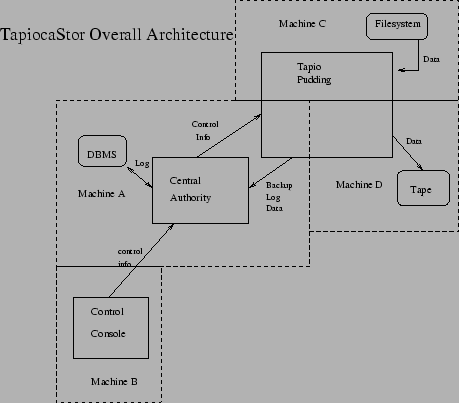
See Figure 1.
TapiocaStor is a highly componetized distributed network backup program that was architected to get something working quickly with lots of people working independently on small parts of the project. Almost every component can be tested in a stand-alone manner and we will be able to do actual network backups and restores long before the program is anywhere near finished.
TapiocaStor consists of these major components:
The basic sorts of tapio components are:
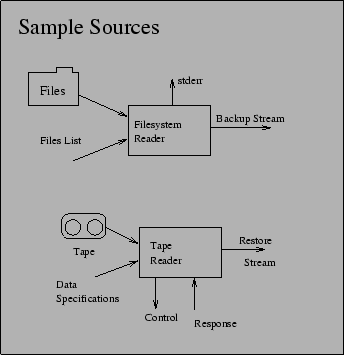
Sources (see Figure 2) take data from some device or external source, and output a backup stream. Some example sources are:
It is obvious that we can also easily have things like src_ndmp (to get a stream from a NDMP device), src_oracle (to get an Oracle backup stream without having to put Oracle offline), etc.
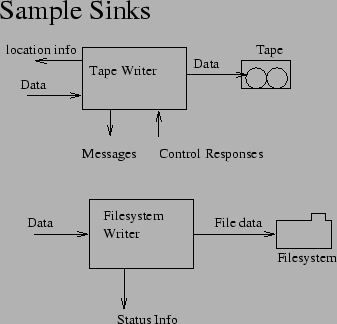
Sinks (see Figure 3) take a backup stream, and consume it by storing it on some sort of media. Some example sinks are:
It should be obvious by now that we can write sinks that can save data to a wide variety of destinations. If we want to write an archive to a ZIP disk rather than to tape, for example, we just need to write the appropriate sink and use it in our tapioca pudding rather than the sink_tape sink. Similarly, if we wish to restore data to a NDMP-based network appliance rather than to a filesystem, all we need to do is write the appropriate sink and use that in our pudding rather than the sink_filesys sink.
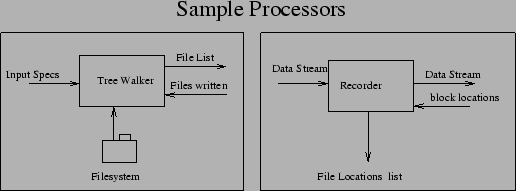
Processors (see Figure 4) take a stream, and do some processing on it. In the process they may touch the filesystem or a SQL database to obtain some information. Not all processors process the data stream, some process filename streams or otherwise do stuff that is important for backup and restore.
Some example processors are:
These basically either combine multiple streams (funnels) or split a single stream into multiple streams (tees).
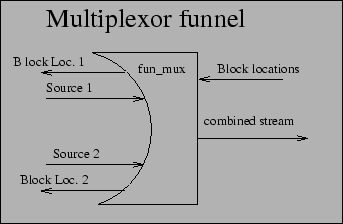
An example funnel is fun_mux (Figure 4). The multiplexer funnel operates by taking incoming streams from multiple systems, and combining them into one stream. It understands the basic structure of the backup streams and thus is able to keep the backups from stomping on each other. This allows multiple backups to go to the same tape in parallel (useful for doing network incremental backups).
Block location data is passed back upstream to the appropriate source so that data can be properly logged and recorded by an upstream processor responsible for that particular stream of data.
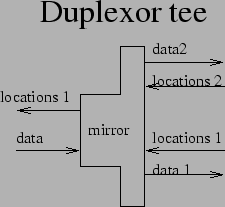
An example tee is tee_mirror (Figure 6). It takes a single input stream, and splits it into two output streams, so that a single backup can be duplexed (written to two different destinations). At the moment, due to limitations on how the tapioca store maintains backup information, only one of these streams will get its details logged (the Central Authority tells the 'glue' which stream's details to pass upstream). Since upstream could have been fun_mux, the data logger processors are upstream of tee_mirror.
There are basically three kinds of plumbing used in 'tapio': anonymous pipes (i.e., created by a pipe(2) call), named pipes (used for plumbing other than stdin/stdout/stderr), and sockets (used by the plumbers to simulate pipes on remote systems). As far as all components are concerned, they are all sucking on or writing to pipes. Sockets are used only by the plumbers to (transparently) run a component on the remote end.
Since pipes and named pipes as plumbing are covered by a number of excellent books (such as Stephens), the plumbers will be the focus here. The plumbers take a variety of input pipes, multiplex them over a socket, and demultiplex them on the other end of the socket. They do the same thing with output pipes.
The plumb command installs some plumbing and talks to the designated remote plumber. A command is passed to the plumber telling it what component in the gluepot to execute on the other side of the connection. All local read and write named pipes named in the plumb command are echoed across the network connection, as are stdio, stdout, and stderr. The protocol allows a maximum of 254 filehandles shipped across the network this way (the other two are used for control). In actuality, more than 4 or 5 is unlikely.
plumb and netplumber (the server that lives on the other end of the connection) handle network encryption internally. They use the OpenSSL library to communicate via ARC4 stream cipher and RSA key exchange. If you are concerned about performance, OpenSSL also allows connections to be 'plain text' (i.e., w/no encryption), which still, however, provides for strong authentication using MD5 or SHA1 checksums.
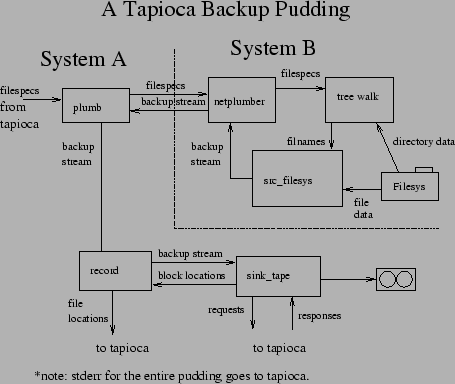
A simple network backup looks like figure 7. Note that stderr for the entire pudding gets sent to tapioca (the tapio control authority), which presumably logs it. The record processor may also be sending some progress info to tapioca for display to the user. Neither of these are shown because neither affects the internal workings of the pudding. Note that the netplumber takes care of forwarding stderr as well as the two shown communication channels.
A more sophisticated pudding will probably include 'lzop' on the data source side of things (system B) to compress the network stream, and 'lzop -d' between 'plumb' and the record keeper to uncompress the network stream. That way the data will be compressed going over the network.
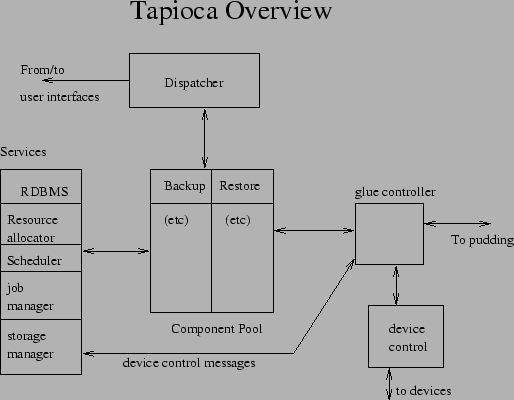
The tapio central authority (see Figure 8)is a Java program which allows remote execution of operations on behalf of end users. It accepts commands from clients, dispatches them to the appropriate component for processing that command, and keeps the appropriate services running that are used by those components.
Despite the opinion of this author regarding threads, the tapio central authority is a multithreaded program. This is due to the fact that Java is not comfortable with the notion of a ``process''. Java has some language features that make it somewhat more ``thread safe'' than most languages, but it is envisioned that this will make the central server slightly less robust than an architecture based upon independent processes. It was judged that this was an acceptable tradeoff, due to the advantages of using Java in terms of portability and etc. Do note that puddings are spawned off as processes - the components therein are written in ``C'' or C++ and thus do not have Java's adversion to fork().
The major components of the central authority are:
When we get to the details of the central authority, we will dissect the architecture further here. At the moment the central authority's design is only roughly sketched and is still a couple of months away from work starting on it, so there isn't anything else for here. The priority at the moment is the pudding - we need to be able to do network backups before we need to worry about how to manage them.
Clients may live anywhere on the network that is capable of connecting to the central authority. Clients communicate with the central authority via the tapicom protocol. The tapicom protocol is similar to Kerberos in that you check out a ticket via a ``login'' process to create a session ticket, then all further communications are authenticated using that ticket. All communications are encrypted for security purposes. All operations other than the initial login require that you have already associated a valid machine,login id,password triplet with your session. All logins are authenticated against the machine indicated, unless there is already a machine,login id,password triplet in tapioca's own user database for that user (i.e., unless it is a server-authenticated user). Tickets remain valid until you log them out. On the server side, ``tapioca'' stores the ticket information in a database, so tickets never time out. The password itself is not stored - it is discarded after being checked for validity.
The tapicom protocol is command-response oriented. Commands are issued to the central authority. A response is received. More as details of tapicom are worked out.
All clients for Tapioca are written in Java.
There are three clients for Tapioca:
This document was written in LaTeX on Red Hat 7.1 Linux. All figures were drawn using 'xfig' and included in the document via the epsfig package. No non-free software was used in the production of this document.
This document was generated using the LaTeX2HTML translator Version 2K.1beta (1.47)
Copyright © 1993, 1994, 1995, 1996,
Nikos Drakos,
Computer Based Learning Unit, University of Leeds.
Copyright © 1997, 1998, 1999,
Ross Moore,
Mathematics Department, Macquarie University, Sydney.
The command line arguments were:
latex2html -local_icons -no_auto_link -no_subdir -split 0 -show_section_numbers Main.tex
The translation was initiated by The Unknown Hacker on 2001-07-01